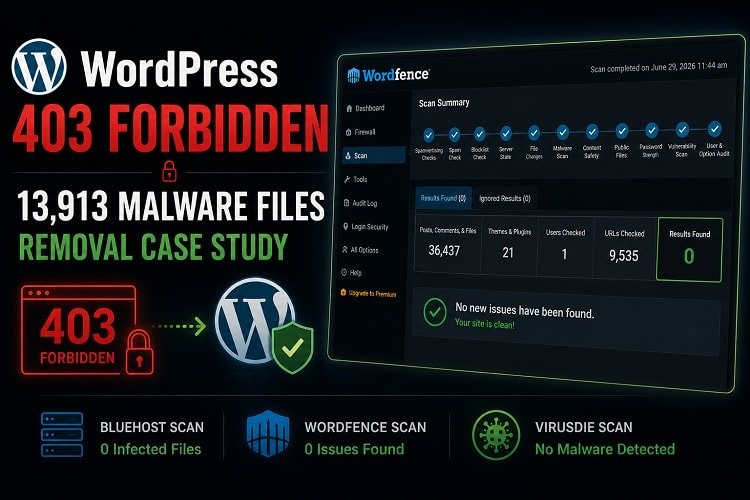
Recently, a client contacted me on Fiverr because two of his five WordPress websites were showing a WordPress 403 Forbidden error. He had already contacted Bluehost support, and they confirmed that the hosting account was infected with malware.
Bluehost generated a malware scan report for the hosting account. The report showed 13,913 infected files across the hosting.
After reviewing the report, the client asked me to clean the hosting account. Since all five websites were hosted in the same cPanel account, I decided to clean the entire hosting instead of only fixing the two broken websites.
This case study explains how I removed the malware and verified the cleanup using three different security scanners.
Reviewing the Bluehost Scan Report
After logging into the Bluehost account, I first checked the malware scan report.
The report showed:
- 13,913 infected files
- Malware inside PHP files
- Malicious
.htaccessfiles - A few infected JavaScript files
The first thing I noticed was that most infections were inside .htaccess files. The remaining infections were mostly PHP files.
This told me that the attacker had used different techniques instead of relying on only one malware type.
Restoring the First Website
I always start with one website before cleaning the others.
First, I checked which WordPress version the website was using.
Instead of updating WordPress immediately, I downloaded the same version and replaced all WordPress core files with clean copies.
This removes modified core files without creating compatibility issues.
Then I opened the root .htaccess file.
I found the following code:
<FilesMatch "\.(php|php5|phtml)$">
Order allow,deny
Deny from all
</FilesMatch>
This rule blocks access to all PHP files.
That was the reason visitors were seeing the 403 Forbidden error.
I replaced the malicious and corrupted .htaccess file with a clean .htaccess code. After that, the website started loading again.
However, I knew the website was still infected because the malware report showed many infected files inside the wp-content directory.
Cleaning Hidden .htaccess Files
Next, I enabled SSH access from Bluehost and generated a new SSH key.
After connecting the hosting account to my terminal, I moved into the website directory and removed all unnecessary .htaccess files.
I used the following command:
find */* -name .htaccess -exec rm -f {} \;
This command removes .htaccess files inside subdirectories.
In a normal WordPress website, only a few .htaccess files are necessary. Attackers often create hundreds of hidden .htaccess files to block access or execute malicious rules.
Some files could not be deleted because of incorrect file permissions.
So I restored the default WordPress permissions first.
find . -type d -exec chmod 755 {} \;
find . -type f -exec chmod 644 {} \;
Directories should normally use 755 permission, while files should use 644. Restoring these permissions allowed the remaining malicious .htaccess files to be removed safely.
After fixing the permissions, I ran the removal command again and cleaned all malicious .htaccess files.
Cleaning PHP Malware
The next step was cleaning the infected PHP files.
This required extra attention.
Some files were completely malicious and could be deleted safely.
Others were legitimate WordPress files that had malicious code injected into them.
For example, I found this MU plugin:
/wp-content/mu-plugins/test-mu-plugin.php
Inside it was obfuscated code like:
$keys = ['b6a4', 'a9bc', '8d6a', '7e6c'];
$_11f9 = $_6f1e[$keys[0]] . $_6f1e[$keys[1]] .
$_6f1e[$keys[2]] . $_6f1e[$keys[3]];
define("Zz8x7Y", $_11f9);
This file was entirely malicious, so I removed it completely.
On the other hand, I also found malware injected into the active theme’s functions.php file.
Deleting this file would immediately break the website.
Instead of deleting it, I manually removed only the malicious code while keeping the original WordPress functions.
This process had to be repeated many times because every infected file was different.
Using Multiple Scanners
After the manual cleanup, I started another Bluehost malware scan.
Since all five websites were included, I knew the scan would take several hours.
While waiting, I installed Wordfence on the websites and started another scan.
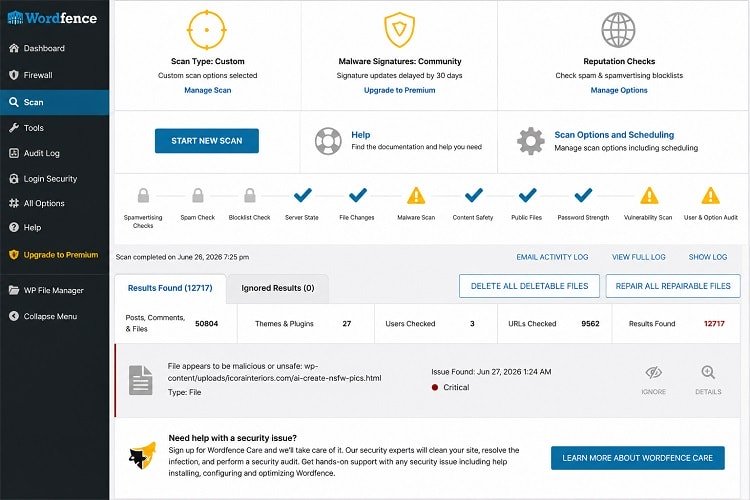
One website alone showed 12,717 issues.
At first this looked confusing.
Bluehost reported 13,913 malware files for five websites, while Wordfence reported 12,717 issues on only one website.
The reason was simple.
Many of the Wordfence detections were spam HTML files created by attackers.
These files were used for spam SEO and Google indexing.
Although they could not directly execute PHP code, they could still damage the website’s reputation and search rankings.
Bluehost did not classify many of these files as malware, but Wordfence detected them as security issues.
I manually removed all spam HTML files.
After another Wordfence scan, no issues were found.
I also scanned every website using Virusdie, and it also reported no malware after the cleanup.
Final Security Checks
When the Bluehost scan finished, it still detected a few infected files.
These were not inside the websites.
They were located in cPanel directories such as:
tmpmailetc.cpanel- and some others
I followed the report carefully, removed the remaining files, and started one final Bluehost scan.
This time, Bluehost reported 0 infected files.
Before completing the project, I performed several additional checks.
- Reviewed all cron jobs. No suspicious jobs were found.
- Removed my temporary SSH key and disabled SSH access.
- Reviewed FTP accounts with the client and removed unused accounts.
- Checked every WordPress installation and removed unknown administrator accounts after client confirmation.
- Asked the client to change all cPanel, WordPress, and email passwords immediately after the cleanup.
Final Result: WordPress 403 Forbidden Fixed
After completing the cleanup:
- Both broken websites were working again.
- All five WordPress websites were cleaned.
- Malicious
.htaccessfiles were removed. - PHP backdoors were removed.
- Spam HTML pages were deleted.
- Unknown administrator accounts were removed.
- Temporary SSH access was disabled.
- Bluehost’s final scan reported 0 infected files.
- Wordfence found 0 issues after the final scan.
- Virusdie also reported no malware.
Conclusion
This project reminded me that WordPress malware cleanup is not just about deleting infected files. Every file needs to be checked carefully because some files should be removed completely, while others only need the malicious code removed.
Using more than one security scanner was also important. Bluehost, Wordfence, and Virusdie each detected different types of issues. By combining manual investigation with multiple security tools, I was able to clean all five websites and restore the hosting account safely.
If your WordPress website or hosting account has been infected with malware, feel free to contact me. I’ll help you identify the infection, remove it safely, and secure your website to reduce the risk of future attacks.
About the Author

Munem Sahriar
Munem Sahriar is a Web Developer and Security Consultant with 6+ years of experience, specializing in WordPress development, website security, malware removal, and vulnerability resolution. He has resolved security issues for 1500+ websites, developed 50+ sites, and worked with clients across 60+ countries, along with solid knowledge of digital marketing.
WordPress Development and Security Support
From WordPress development to malware removal and blacklist recovery, I help fix errors and secure your website efficiently.