If you search for Avast URL Blacklist issues, you will notice that many website owners think their website is still infected. However, that is not always true. Sometimes the malware is already removed, but Avast still blocks the website until their team reviews it. In this case study, I will share a real client project where cleaning the malware was only half of the work. The biggest challenge was getting the website removed from the Avast blacklist.
Understanding the Avast URL Blacklist Issue
The client was using Avast Antivirus, which completely blocked the website. Other visitors who were not using Avast could still access it.
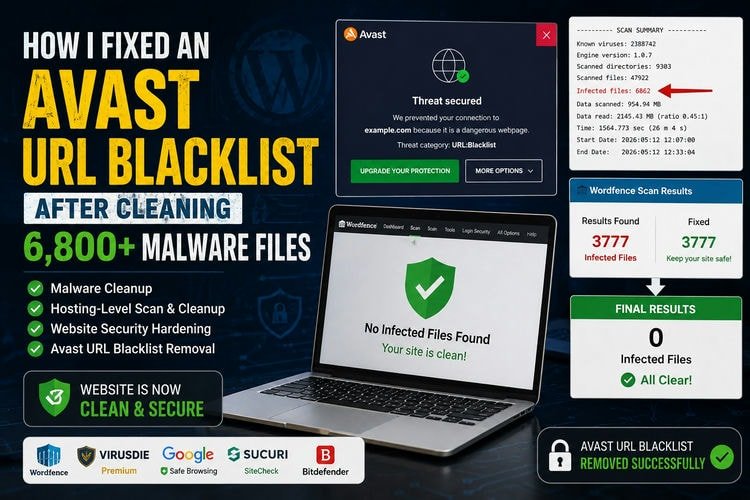
After receiving the WordPress and hosting credentials, I first checked the HostGator File Manager. I found the hosting malware scan report (scanreport.txt), and the report showed 6,862 infected files.
To verify the situation from inside WordPress, I installed Wordfence Security and started a full scan. The result showed 3,777 malware detections.
At this point, it was clear that the website had a serious malware infection, and the Avast URL blacklist warning was not a false alarm.
Creating a Safe Backup Before Cleanup
Before making any changes, I created a complete website backup.
This is one of the most important steps in malware removal. If anything goes wrong during cleanup, the website can be restored immediately. Skipping this step can create much bigger problems later.
Cleaning the WordPress Infection
I started by replacing all WordPress core files with fresh copies.
After that, I investigated the .htaccess files using SSH.
Normally, a WordPress website has only a few .htaccess files. However, after running the command below, I discovered something very unusual.
find */* -name .htaccess | wc -l
The result showed 2,813 .htaccess files.
This was a clear sign of malware.
I removed all unnecessary .htaccess files using:
find */* -name .htaccess -exec rm -f {} \;
However, many files could not be deleted because several directories had incorrect permissions.
To fix this, I corrected the folder and file permissions.
find . -type d -exec chmod 755 {} \;
find . -type f -exec chmod 644 {} \;
After fixing the permissions, I ran the removal command again, and this time all malicious .htaccess files were deleted successfully.
Second Scan Reduced the Infection from 3,777 to Only 68 Files
After removing the infected .htaccess files and replacing the WordPress core files, I started another Wordfence scan.
The results were encouraging.
The malware count dropped from 3,777 to only 68 infected files.
Instead of using automatic cleanup, I removed every remaining malware file manually.
I carefully checked:
mu-plugins- Uploads folder PHP files
- Themes
- Plugins
- Suspicious PHP scripts
Automatic cleanup can sometimes remove important files, which may break the website. Manual review takes more time, but it greatly reduces the risk of causing a critical website error.
After finishing the cleanup, I tested the website carefully. Everything worked perfectly.
Another Wordfence scan reported 0 infected files.
To double-check the result, I scanned the website using Virusdie Premium, which also confirmed No infected files found.
Why Did HostGator Still Show 6,862 Infected Files?
Although WordPress was completely clean, the hosting scan still originally showed 6,862 infected files.
After investigating the entire hosting account, I found the reason.
Most of the remaining malware was outside the active WordPress installation.
The largest problems were:
- Thousands of malicious
.htaccessfiles in other directories - Malware inside deleted folders stored in
.trash
These files were not affecting the live website, but they still existed inside the hosting account.
I removed all remaining malicious .htaccess files and permanently deleted every infected file inside the .trash directory.
After running another HostGator malware scan, the result became: 0 Infected Files
The hosting account was finally clean.
Securing the Website After Cleanup
Removing malware is only part of the job. Preventing future attacks is equally important.
After cleaning the website, I strengthened its security by:
- Configuring and optimizing Wordfence Firewall
- Installing additional 6G Firewall rules
- Applying HackRepair protection
- Adding server-level
.htaccesssecurity hardening - Restricting direct access to sensitive files
- Adding important security headers
- Installing Cloudflare Turnstile on the WordPress login page
I also reviewed all user accounts.
The website had 67 administrator accounts, which is highly unusual.
After discussing it with the client, I removed unnecessary admin users and kept only two trusted administrator accounts. I also changed their passwords.
Finally, I removed unused FTP users with the client’s approval and disabled SSH access after completing all work.
The Final Challenge: Removing the Avast URL Blacklist
At this stage, every security scanner confirmed that the website was clean.
The following services reported no malware:
- HostGator Malware Scanner
- Wordfence
- Virusdie Premium
- Google Safe Browsing
- Sucuri SiteCheck
I submitted a false positive review request to Avast and attached all scan reports.
Unfortunately, after waiting almost 48 hours, there was no response.
I submitted another review request.
At the same time, I also submitted the website to Bitdefender.
Bitdefender reviewed the website within about 12 hours and confirmed it was clean. They removed the blacklist immediately.
Avast, however, still did not respond.
Since this was only the second Avast blacklist case I had seen in six years, I contacted one of my senior security colleagues. He told me that Avast support sometimes responds faster through their official Facebook page than through the review form.
I followed his advice.
This time, Avast support replied, collected the required information, created an official support case, and forwarded it to their senior team.
About 24 hours later, Avast confirmed the website was clean and removed the blacklist.
The client tested the website using Avast and confirmed everything was working normally again.
Final Thoughts
This project was much more than a normal malware cleanup. It required investigating both the WordPress website and the entire hosting account, manually removing thousands of malicious files, fixing incorrect permissions, securing the server, and communicating directly with antivirus vendors.
Although most malware cleanup projects are completed within 24 to 48 hours, this one took 7 days because the final solution depended on Avast’s review process rather than the cleanup itself.
If your website is showing an Avast URL blacklist warning, do not assume the website is clean just because it opens on another computer. Always perform a complete malware investigation, verify the hosting environment, confirm the cleanup with multiple trusted scanners, and if necessary, work directly with the antivirus vendor to request a blacklist review.
If you are facing an Avast URL Blacklist issue, website malware infection, Google Safe Browsing warning, or any other website security problem, feel free to contact me. I will investigate the issue carefully, clean your website safely, and help restore its security and reputation.
About the Author

Munem Sahriar
Munem Sahriar is a Web Developer and Security Consultant with 6+ years of experience, specializing in WordPress development, website security, malware removal, and vulnerability resolution. He has resolved security issues for 1500+ websites, developed 50+ sites, and worked with clients across 60+ countries, along with solid knowledge of digital marketing.
WordPress Development and Security Support
From WordPress development to malware removal and blacklist recovery, I help fix errors and secure your website efficiently.